

How many hours this year did you spend getting back to something that was already running? Most engineers I ask guess ten minutes a day. Then they count the VPN logins, the SSH hops, the lost tmux windows and the "let me check from the office" trips, and the honest answer comes closer to an hour. I have run a software company for twenty-five years, and this is the gap my team built Dialout to close, first for ourselves and now as open source for anyone.
The scene that pushed us is one I have lived more than once. A long migration is running on my office desktop. I am somewhere else with only a phone. The single way to know the status is to call a colleague and ask him to read the terminal aloud. He reads it. The script failed forty minutes ago, and nobody was looking. My realisation that evening was simple: the script was fine, my own computer was unreachable to me.
What changed: your work now runs on machines you cannot see
Three things changed at the same time, and together they made the old habits expensive. AI coding tools like Claude Code, OpenAI Codex and Grok run as long sessions in a terminal, sometimes for hours, and they need a human to answer a question at unpredictable moments. Most of us now work across more than one computer. And remote work means the computer doing the job is often in a different building from the person responsible for it.
Think about it. A build that takes forty minutes does not need you for forty minutes. It needs you for the ninety seconds when it asks something or fails. The other thirty-eight minutes you are either sitting in front of it out of anxiety or walking away and finding out late. Both waste the same thing: your attention.
The old answers were built for a different problem. A VPN gets you onto a network, which is useful when the machine is a server in a rack. It is far less useful when the machine is a laptop on a home router in Surat and the second machine is a Mac mini under a desk in Ahmedabad. Port forwarding needs a router you control. SSH needs a reachable address. Every one of these assumes somebody can dial in.
Dialout starts from the opposite assumption. According to the dialout.dev site, the agent dials out to your server and holds the socket open, so nothing has to dial in. There are no inbound ports, no VPN and no port forwarding. Your machines reach the room; the room never has to reach them.
What is Dialout, and how does it reach a machine with no open ports?
Dialout is a self-hosted control room for every machine you own: a small agent on each computer connects outbound over WebSocket to a server you run, and a web dashboard lets you see ports, terminals, live previews and AI sessions from any browser or phone. The GitHub README states the agent runs on macOS and Linux, the server anywhere Node and PostgreSQL run.
Three concepts carry most of the value, so they are worth understanding properly before installing anything.
The agent that dials out
Each machine runs a tiny agent. It opens one outbound connection to your server and keeps it alive, exactly the way a browser keeps a chat page connected. Because the connection starts from inside, it passes through home routers, office firewalls and hotel Wi-Fi without any configuration on that network. The server side is deliberately small. The project's README describes one WebSocket process of 1,753 lines in one file, binding to localhost only, with a reverse proxy in front of it.
Terminals that survive you
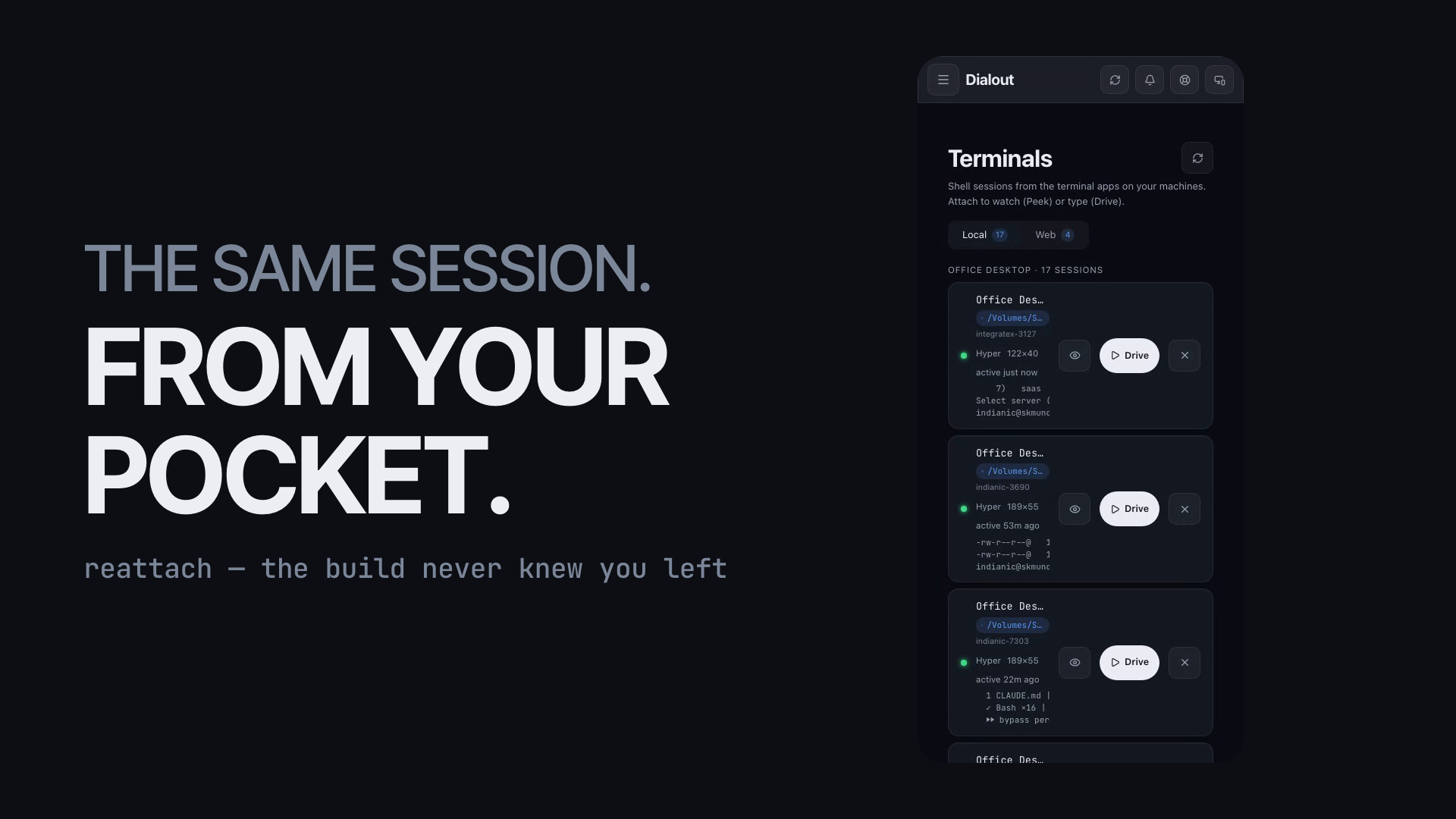
Dialout terminals are backed by tmux, and this matters more than it sounds. A tmux session lives on the machine, independent of any window looking at it, so the build never knows you left. The dashboard shows the same sessions your native terminal app shows, resumable by name. You can attach to watch, which Dialout calls Peek, or attach to type, which it calls Drive. The screenshot above is my real office desktop: seventeen sessions, one of them active fifty-three minutes ago, all reachable from a phone.
AI sessions as chat
This is the feature I did not expect to use most, and now I use it daily. An AI coding session running on any machine in your fleet appears in Dialout as a chat. When Claude Code stops to ask whether it may run a command or overwrite a file, that question reaches you wherever you are, and you answer it from the same screen. The agent keeps working. You keep walking.
Around these three sit the practical pieces: live port checks saved as projects, process control, notes and todos per project, an HTTP tunnel that gives a localhost app a public URL with a 10 MB body cap, a file browser, system services through PM2, launchd and systemd, a credentials vault using AES-256-GCM encryption, and web push notifications. Account access needs a PIN plus mandatory TOTP. The README lists 38 API routes and says every one of them is authenticated.
There is nothing so useless as doing efficiently that which should not be done at all.
Peter Drucker wrote that about management, and it applies word for word to reconnecting. The fifteen-minute VPN ritual was efficient. It was also work nobody should have been doing.
How do I set up Dialout on my own machines?
Setting up Dialout takes three commands on each machine plus a one-time server install: run npm install -g @indianic/dialout, then dialout init, then dialout status. The server needs Node 18 or newer, a PostgreSQL database and a reverse proxy that supports WebSocket upgrade. The whole project is free and MIT licensed, with nothing held back for a paid tier.
Here is the order that worked for us, and the order I would give a friend.
- Put the server somewhere you already trust. A small VPS, an office box, or the same Mac mini that never sleeps. Install Node 18+, PostgreSQL, and a reverse proxy such as Nginx or Caddy that can upgrade WebSocket connections.
- Install the agent on your first machine with the @indianic/dialout package and run dialout init. It walks you through pointing the agent at your server.
- Run dialout status and open the dashboard. Set your PIN and enrol TOTP in an authenticator app. Dialout will not let you skip this step, and you should be glad about it.
- Open the Terminals screen and attach to a session you already have open in your native terminal. Peek first. Then Drive. This is the moment the product makes sense.
- Add your second machine the same way. Now search its ports, save one as a project, and turn on a live port check.
- Start one AI coding session on either machine and answer its first question from your phone.
| Keep the WebSocket server private. It is designed to bind to localhost behind your reverse proxy, with the proxy handling TLS and the public address. Exposing that process directly to the internet is the one setup mistake that undoes the outbound-only design. |
The full walkthrough, the architecture diagram and the source are on GitHub. Native iOS and Android apps are listed as coming soon; the dashboard installs as a PWA today, which is how it sits on my home screen.
Which use cases pay back first?
The honest answer depends on how many machines you own and how often you leave them. The figures below are my own estimates from daily use at IndiaNIC, and I have written them as ranges on purpose. Your numbers will differ. The pattern will not.
Let me pick one row and make it concrete, because a table can hide the feeling. In our office the most common request to the DevOps team used to be a restart: a PM2 process stuck, a queue worker gone quiet, a staging box that needed a nudge. Each request meant a message, a wait, a VPN login, a lookup of which box it was, and a reply. I timed a handful of them at between twenty and forty minutes end to end, most of it waiting. Now the person who notices restarts it from the services screen on the phone, and the DevOps team hears about it in the notes.
The widely held view I disagree with is that this is a convenience for people who cannot sit still. I think it is the opposite. The person who can check a build in thirty seconds from a canteen queue is the person who stops checking it every five minutes at the desk. Reachability is what lets you walk away.
What does success look like, and how do you measure it?
Success with Dialout is measured in interruptions removed, so count those rather than counting features you use. Pick one week before and one week after. Note how many times you reconnected to a machine, how long each took, and how many long jobs failed without anyone seeing them for more than ten minutes.
Three signals told me it was working. First, the number of sessions on my office desktop went up, from a handful to the seventeen in the screenshot, because leaving things running stopped being risky. Second, "can you check the server" messages in our team chat went down, since the person asking could check it themselves. Third, and this one surprised me, AI coding sessions started finishing in one sitting more often, because the questions they raised were answered within a minute instead of after lunch.
The lesson is simple. A tool that gives you your own computer back does not make you work more. It makes waiting stop counting as work.
Here is your action for the next twenty-four hours. Pick the one machine that runs your longest jobs and install the agent on it tonight: npm install -g @indianic/dialout, then dialout init. Tomorrow morning, start one build or one AI session on it, close the laptop, and check it from your phone on the way to work. If that single check saves you one trip back to a desk, you have already earned the setup time.
Frequently asked questions
Is Dialout free to use?
Yes. Dialout is open source under the MIT licence, published by IndiaNIC Infotech Ltd, and the project states that nothing is held back for a paid tier. You host the server yourself, so your only costs are the machine it runs on and the PostgreSQL database it uses. The source is on GitHub.
Does Dialout need a VPN or open ports on my machines?
No, because the agent on each machine connects outward over WebSocket to your server and keeps that connection open. Machines behind home routers, office firewalls or hotel Wi-Fi need no inbound ports, no port forwarding and no VPN. Only your server needs a public address, behind a reverse proxy that supports WebSocket upgrade.
Which AI coding tools does Dialout support?
Dialout shows Claude Code, OpenAI Codex and Grok sessions from every machine you own as chat, so a question one of them raises reaches you on your phone and you answer it from the same screen. The sessions themselves run on your machines inside tmux-backed terminals, which keep running after the browser closes.